
v1.2.0Windows 10 / 11Microsoft StoreZero TelemetryEnglish App UI

NetTool — Network Engineer Toolkit

NetTool is a modern Windows 10/11 desktop toolkit built for network engineers, system administrators, and developers. Powered by React 19, TypeScript, Electron 44, and a local Node.js backend, it runs 100% locally with zero telemetry, no accounts, and no cloud tracking. Available exclusively on Microsoft Store.

Note: The NetTool desktop application interface is in English for global use.

NetTool — Network Engineer Toolkit

Features & Modules

Dashboard

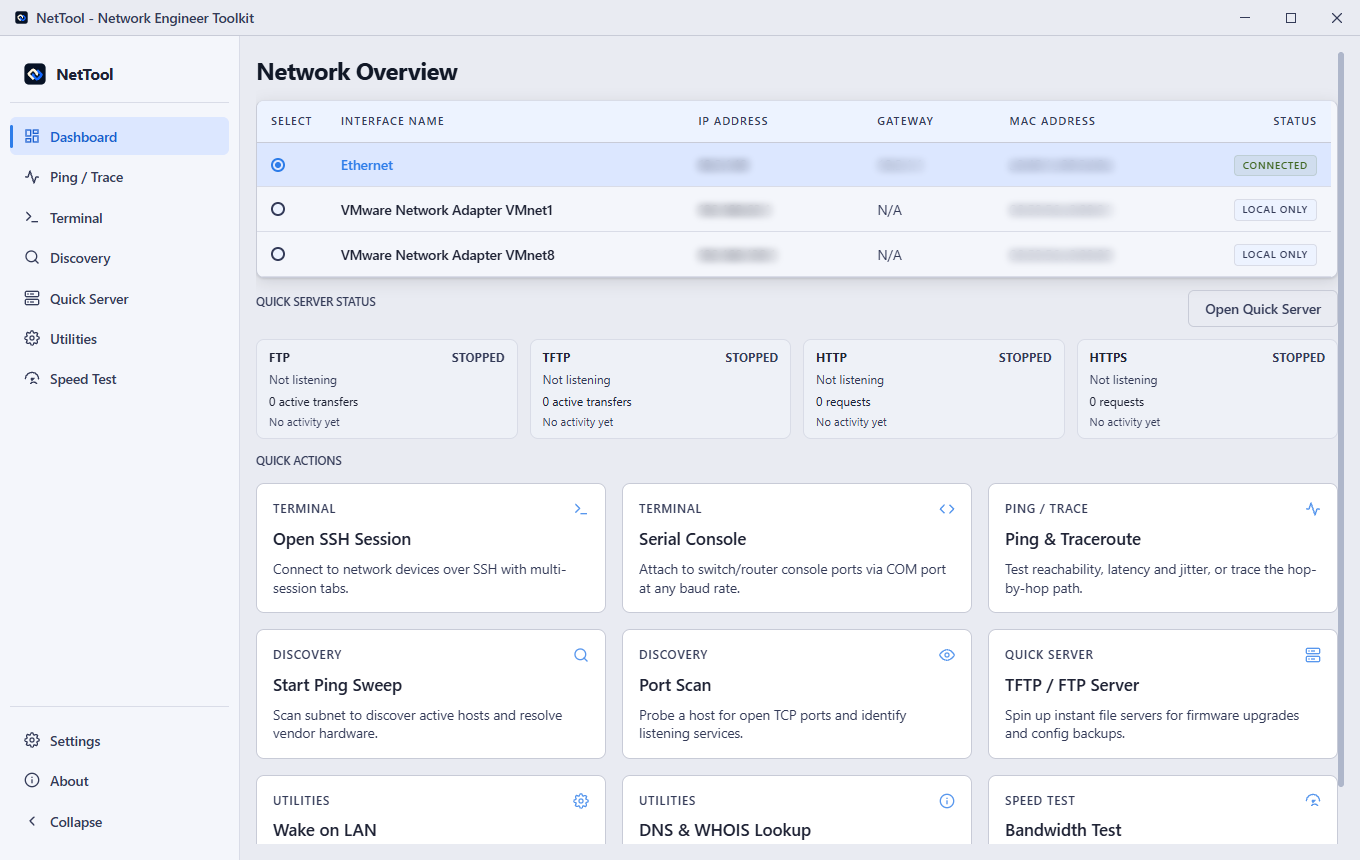
Network Overview

Active network interfaces, live Quick Server summary, and one-click Quick Actions in a single view.

  • Lists physical and virtual adapters with IP, default Gateway, MAC address, connection status, and one-click copy.
  • Live overview of FTP, TFTP, HTTP, and HTTPS server states, active transfers, and recent activity.
  • Quick Action cards for SSH, Serial Console, Ping/Trace, Ping Sweep, Port Scan, Quick Server, WoL, DNS/WHOIS, and Speed Test.

Connection Manager & Multi-Tab Terminal

Terminal & SFTP

Five protocols on xterm.js with encrypted device profiles, macros, and an integrated SFTP file manager.

  • Dual-generation SSH: modern Cisco IOS-XE 17.12.5+ (ETM, AEAD/GCM) and legacy Huawei VRP, 3Com/H3C, HPE Comware 7, Cisco IOS + TOFU host-key checks.
  • Telnet with custom IAC filtering and Serial (COM) console with two-way XMODEM, XMODEM-1K, YMODEM, and ZMODEM firmware transfers.
  • Embedded RDP (IronRDP WASM) with dynamic resolution, High-DPI, clipboard sync, Ctrl+Alt+Del, and one-click mstsc.exe handoff.
  • Embedded Windows PowerShell (ConPTY) in Standard User and UAC Administrator modes, plus resumable SFTP with 2FA/OTP and Root/Sudo elevation.
  • Profiles encrypted locally via Electron safeStorage (Windows DPAPI), multi-line Macros drawer, and up to 50,000 scrollback lines.

Ping & Traceroute

Ping / Trace

Monitor multiple targets simultaneously with live RTT metrics and embedded hop-by-hop traceroute.

  • Parallel multi-target ping with Sent, Success, Failed, Failed %, and Last / Min / Avg / Max RTT metrics.
  • Live hop-by-hop traceroute directly inside an embedded terminal view.
  • Persistent target list automatically restored across restarts.

Network Discovery

Discovery

Scan local subnets, probe open TCP ports, and inspect the local ARP cache in seconds.

  • IP Scanner (Ping Sweep): /24 subnet scan returning active hosts with IP, MAC address, and latency.
  • TCP Port Scanner: Common Ports, 1–1024, 1–65535, or custom ranges with one-click RDP launch on open port 3389.
  • ARP Table: Numerically sorted local IP–MAC mappings with one-click copy.

Quick File Servers

Quick Server

One-click local file servers for firmware upgrades, config backups, and ad-hoc transfers.

  • FTP Server: Anonymous or safeStorage-encrypted auth, passive ports 10000–10050, 5-minute Cisco/IOS NAND timeout protection, and live progress.
  • TFTP Server: RFC 2347/2348/2349/7440 option negotiation (blksize, tsize, windowsize) and 16-bit rollover for 32 MB+ firmware images.
  • HTTP & HTTPS Servers: Static file sharing with persistent auto-generated self-signed SSL or custom certificates.
  • Strict root boundary: Only the user-selected folder is shared; symlinks and Windows junctions cannot escape the root.

Network Utilities

Utilities

Multi-vendor SNMP monitoring, Wake on LAN, MAC vendor lookup, CIDR subnetting, and Split-Horizon DNS/WHOIS.

  • Advanced SNMP Monitor: Hostname, Vendor/Model, Serial, Software Version, Uptime, sysObjectID, and full interface telemetry.
  • Wake on LAN (WoL) supporting colon, dash, and Cisco dot MAC formats plus IEEE OUI MAC Vendor Lookup.
  • IPv4 CIDR Subnet Calculator with interactive CIDR table and RFC 1918 private ranges.
  • Dual-Engine Split-Horizon DNS (OS Resolver vs. 8.8.8.8/1.1.1.1) and WHOIS including official TRABIS (.tr) lookups.

Speed Test

Cloudflare Edge

Real-time Download, Upload, Ping, Jitter, and Loaded Latency (Bufferbloat) over Cloudflare Edge.

  • Parallel HTTP stress streams measuring sustained throughput and latency under load.
  • Dual radial speed gauges and local history of the last 20 tests.

Themes, Accessibility & Security

Settings

Visual ergonomics, keyboard accessibility, and hardened loopback security.

  • Light, Dark, and System Default app themes plus 8 terminal palettes (Tokyo Dark/Light, Classic Green, Retro Amber, Dracula, Solarized Dark, High Contrast).
  • High Contrast mode, Compact Density mode, 12px–24px scalable UI font, and full keyboard navigation.
  • Constant-time verified x-nettool-token loopback auth, asInvoker privilege model, and Windows DPAPI credential encryption.

Official Distribution

Exclusively on Microsoft Store

Windows 10 / 11

NetTool is distributed exclusively through Microsoft Store for Windows 10 and Windows 11 with signed packages and automatic updates.

  • Verified & signed Windows 10/11 package via Microsoft Store
  • Automatic, seamless background updates directly from Microsoft Store
  • 100% local execution with zero telemetry; application UI is in English

Technology Stack & Security Architecture

NetTool v1.2.0 Technical Specifications
Frontend React 19, TypeScript, Tailwind CSS v4, @xterm/xterm v6, ironrdp-wasm
Desktop & Local Backend Electron 44, Node.js (v22.12+), Express 5, Socket.IO
Network & Protocol Engines ssh2, serialport, ftp-srv, net-snmp, selfsigned, whois-json, wake_on_lan, zmodem.js
Security & Credential Storage Electron safeStorage (Windows DPAPI), x-nettool-token loopback auth, asInvoker
Application UI Language English (App UI is English-only for global use)
Distribution Channel Microsoft Store (Exclusive — Windows 10 / 11)
Data & Privacy Model Zero Telemetry, 100% Local Processing (see Privacy Policy)

Frequently Asked Questions

Does NetTool collect any telemetry, analytics, or network data?

No. NetTool is built with a strict Zero Telemetry and 100% Local Processing architecture. It requires no account, performs no cloud sync, and sends no usage or scan data to ALSER Technology.

Where can I get NetTool?

NetTool is available exclusively on Microsoft Store for Windows 10 and Windows 11, ensuring signed packages and automatic updates.

What language is the NetTool application interface in?

The NetTool desktop application interface is in English for global engineering teams, while our website is available in 10 languages.

How are saved SSH, Telnet, RDP, and FTP credentials protected?

All saved profiles and credentials are stored exclusively on your local Windows machine and encrypted using Windows DPAPI via Electron safeStorage.